[database]
type = postgres
host = host_adress
port = 12345
database = QBuildings-name_of_db
username = your_username
password = your_passwordUsage
This part of the documentation explains how to access the database.
Access rights
In a PostgreSQL database, roles can be defined which allows to manage the access on different levels.
Most basics roles are defined as such:
| Role | SELECT | INSERT | UPDATE | DELETE | CREATE/DROP | MANAGE USERS |
|---|---|---|---|---|---|---|
| Admin | ✅ | ✅ | ✅ | ✅ | ✅ | ✅ |
| Modifier | ✅ | ✅ | ✅ | ✅ | ❌ | ❌ |
| Reader | ✅ | ❌ | ❌ | ❌ | ❌ | ❌ |
Depending on the use you will have with the main database, you will get one of those roles.
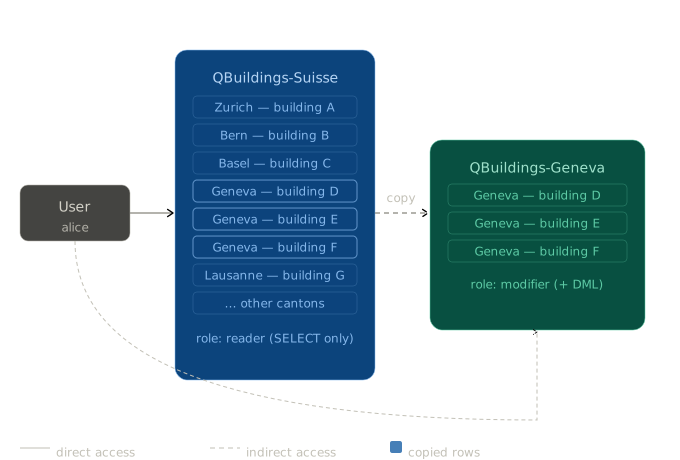
Moreover, for a given project, you can be given a more complete access to a slice of the main database. This will be discussed further.
Basic access
Most of users do not need to modify the database, but only to use the data contained. To do so, the most generic access - a reader user - should be used, with the credentials below.
TipQBuildings reader credentials
[Full Switzerland database]
type     = postgres
host     = qbuildings.epfl.ch
port     = 5432
database = QBuildings-Suisse
username = public_user
password = password
[Geneva region database]
type = postgres
host = ipese-web.epfl.ch
port = 4443
database = QBuildings-Geneva
username = public_user
password = passwordThey are several softwares that provides an interface to get inside a PostgreSQL database. Here is a non-exhaustive list of what could be useful.
QGIS - a geographical view of the data
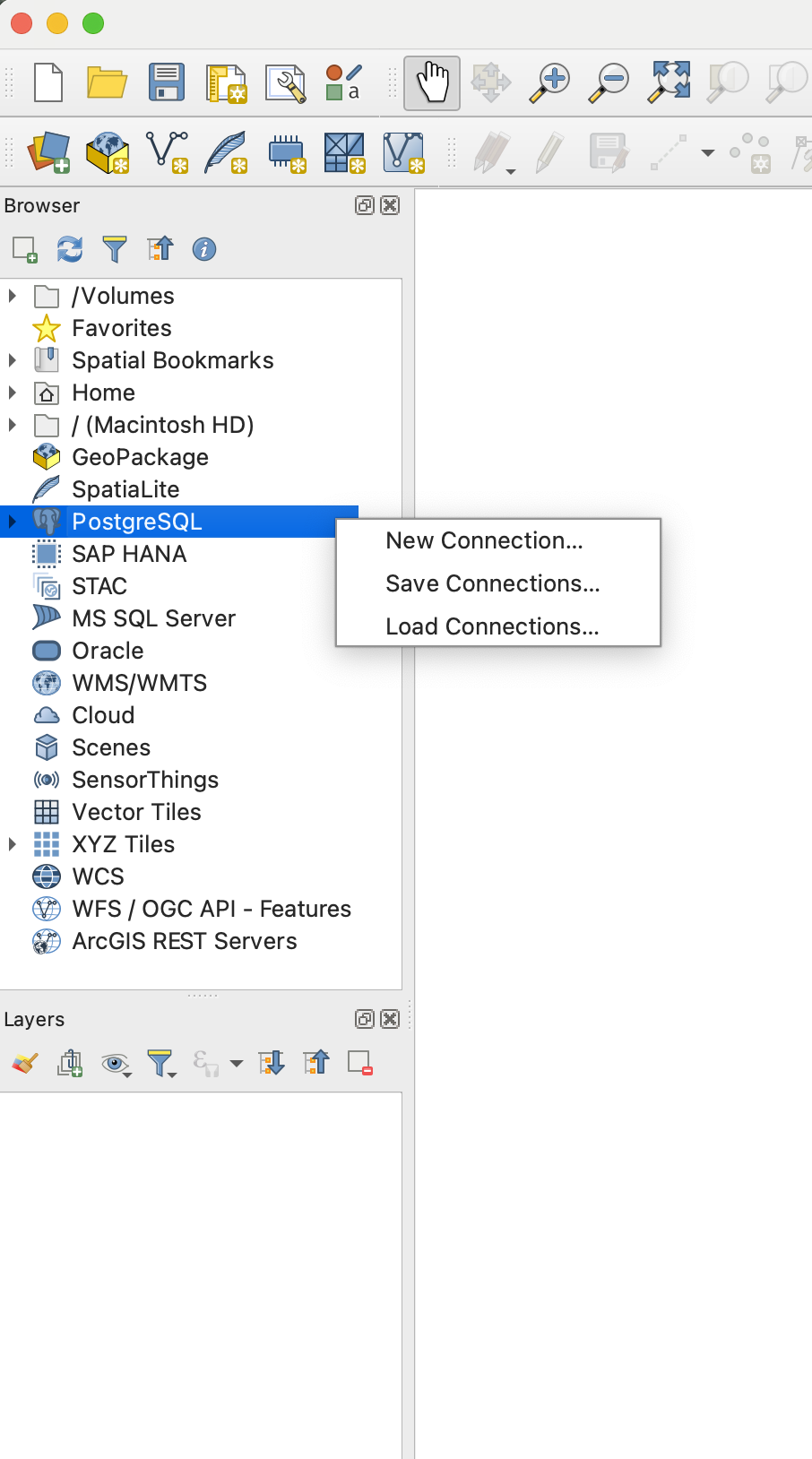
- Open the Browser panel and connect to PostGIS by opening a new connection
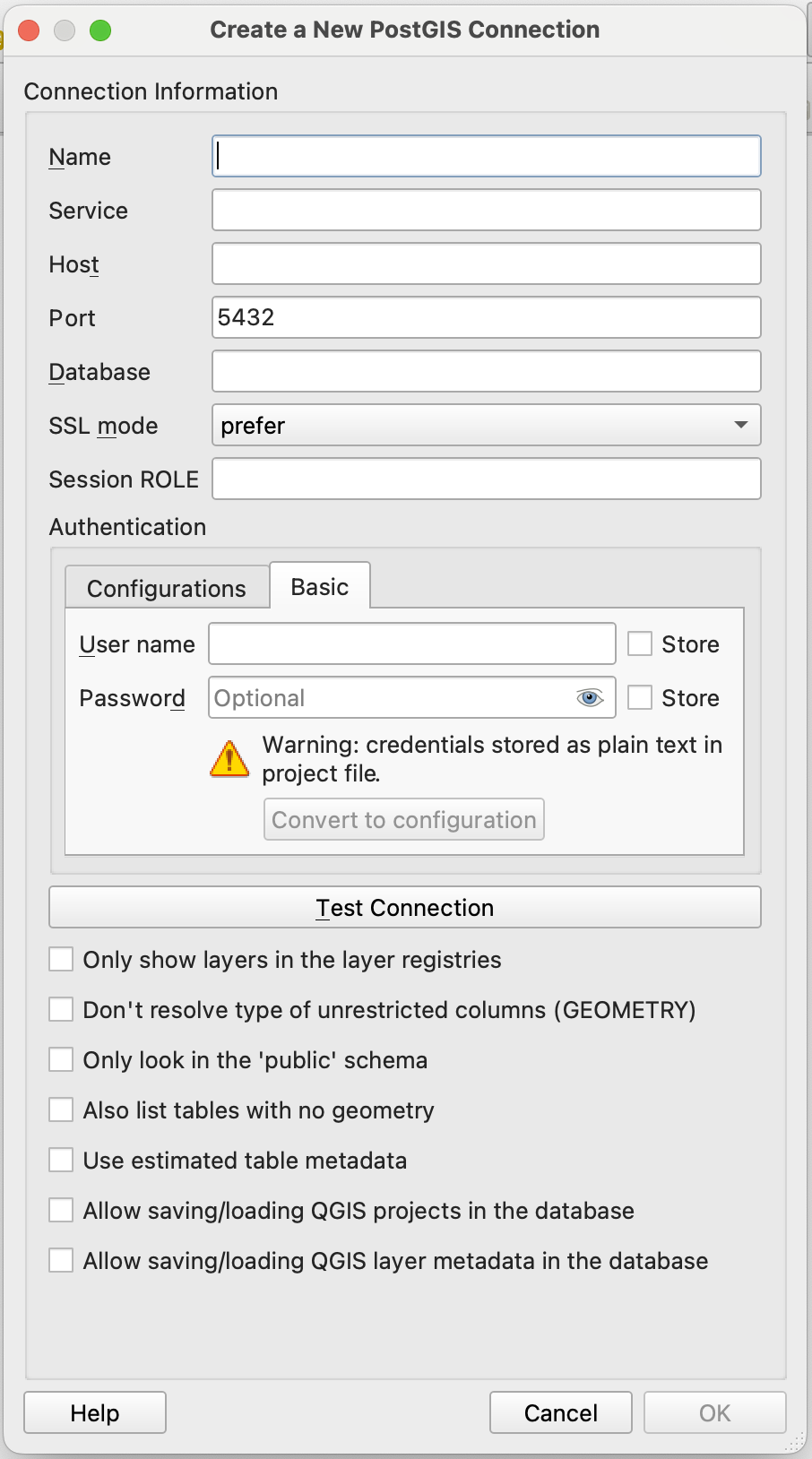
- Fill in the credentials from Section 2 in the window. Pay attention to go to the Basic tab.
Note
Once connected, you are free to load the tables on the map, select the elements as you would do for any layers in QGIS and export the selection in a file (gpkg, shp).
IDE - an access in your coding environment
Several IDEs provides a panel to access a database. The principle is the same every time so let’s explain how to connect in the two most common ones.
Pycharm
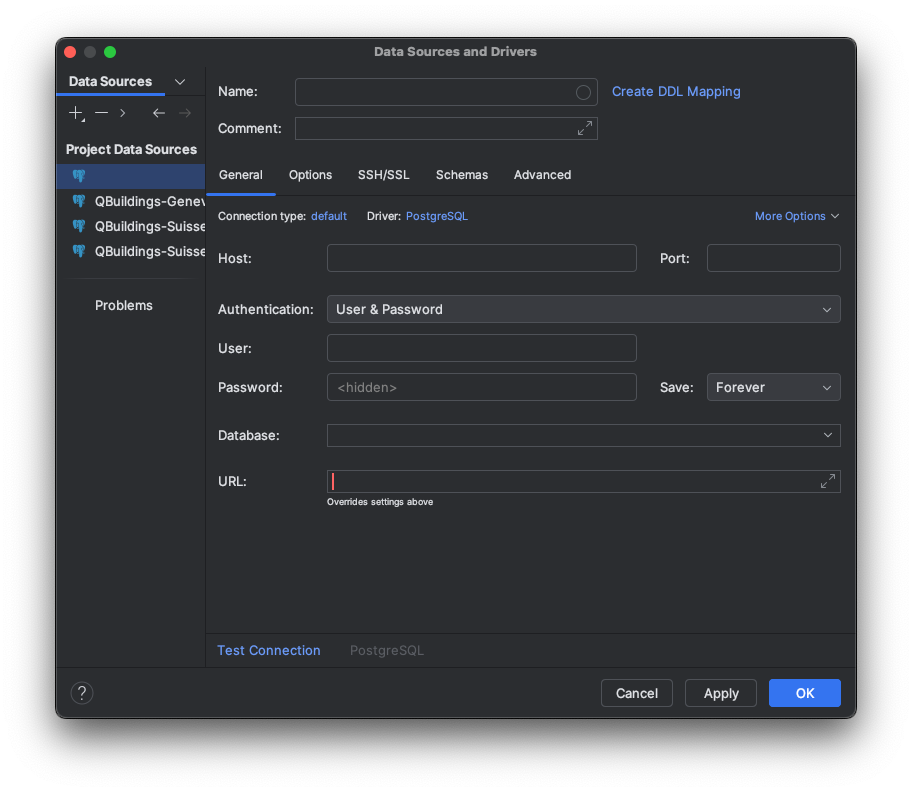
Pycharm sells itself as an IDE where everything is already integrated for you. And they do have a database tab.
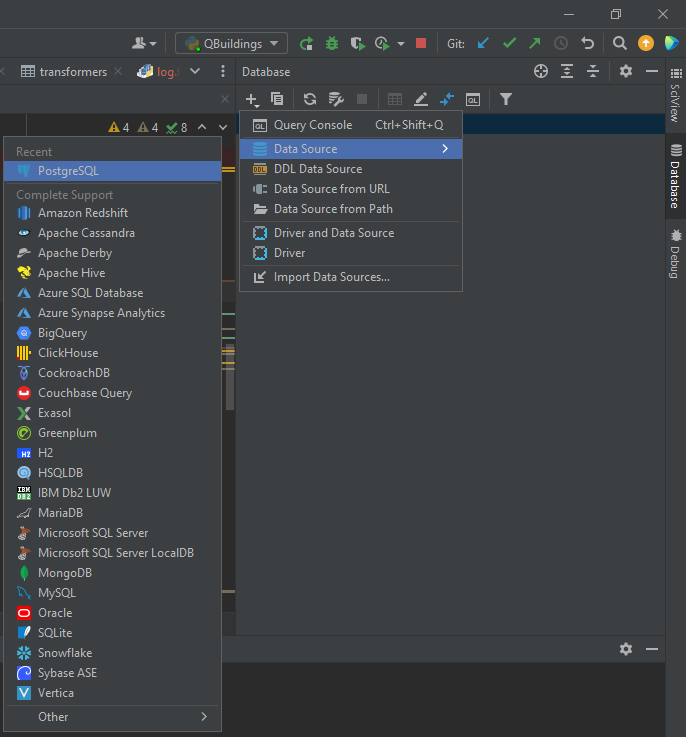
- Open the Database panel and add a connection and find PostgreSQL in the Data Source list.
- Again, fill in the credentials from Section 2 in the window. The Name field can be defined freely, whereas Database should be exact.
Visual Studio Code
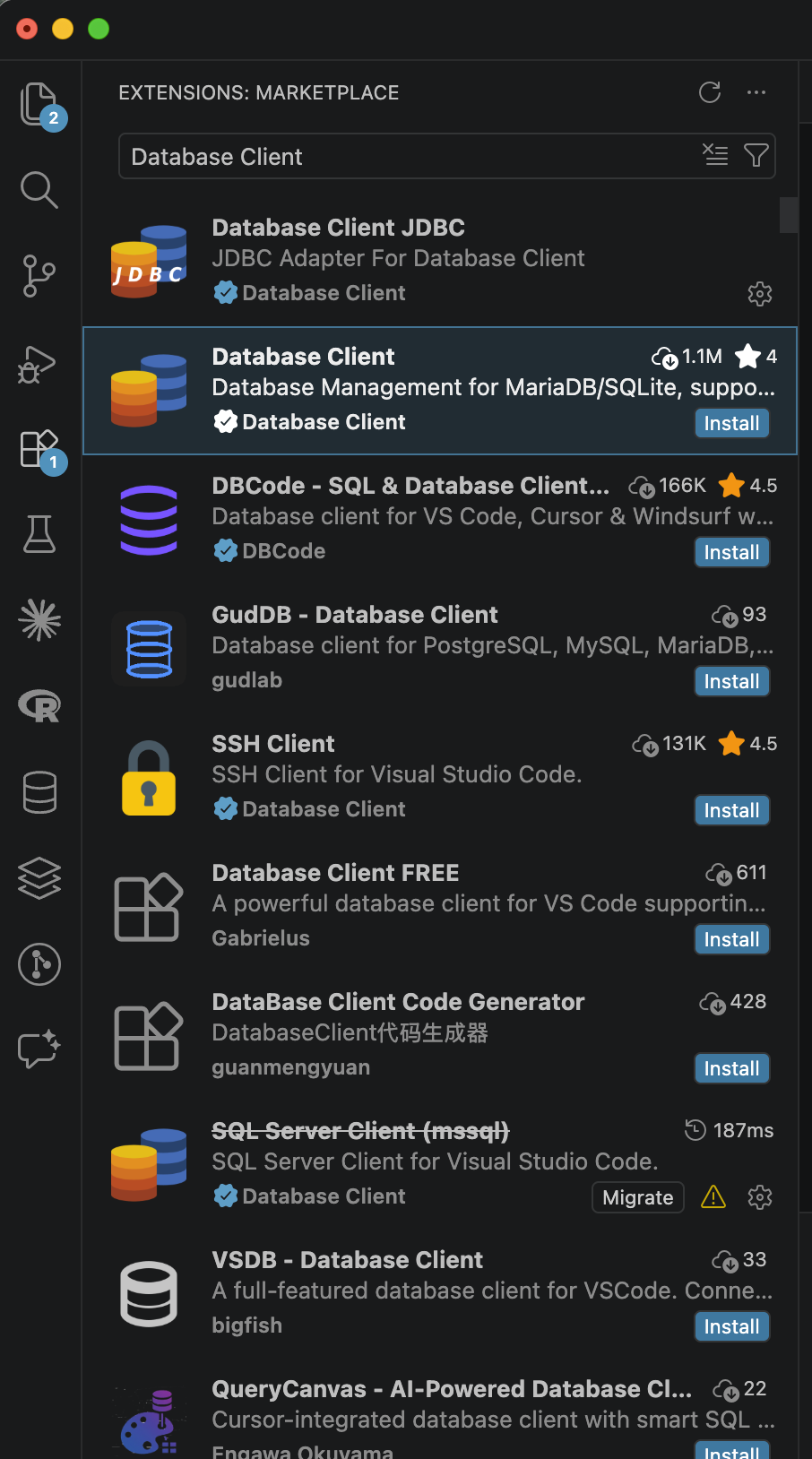
On the contrary, Visual Studio Code relies on a huge community that develops Extensions. Many are available again, the use of Database Client is recommended.
- Open the Extension panel and look for Database Client.
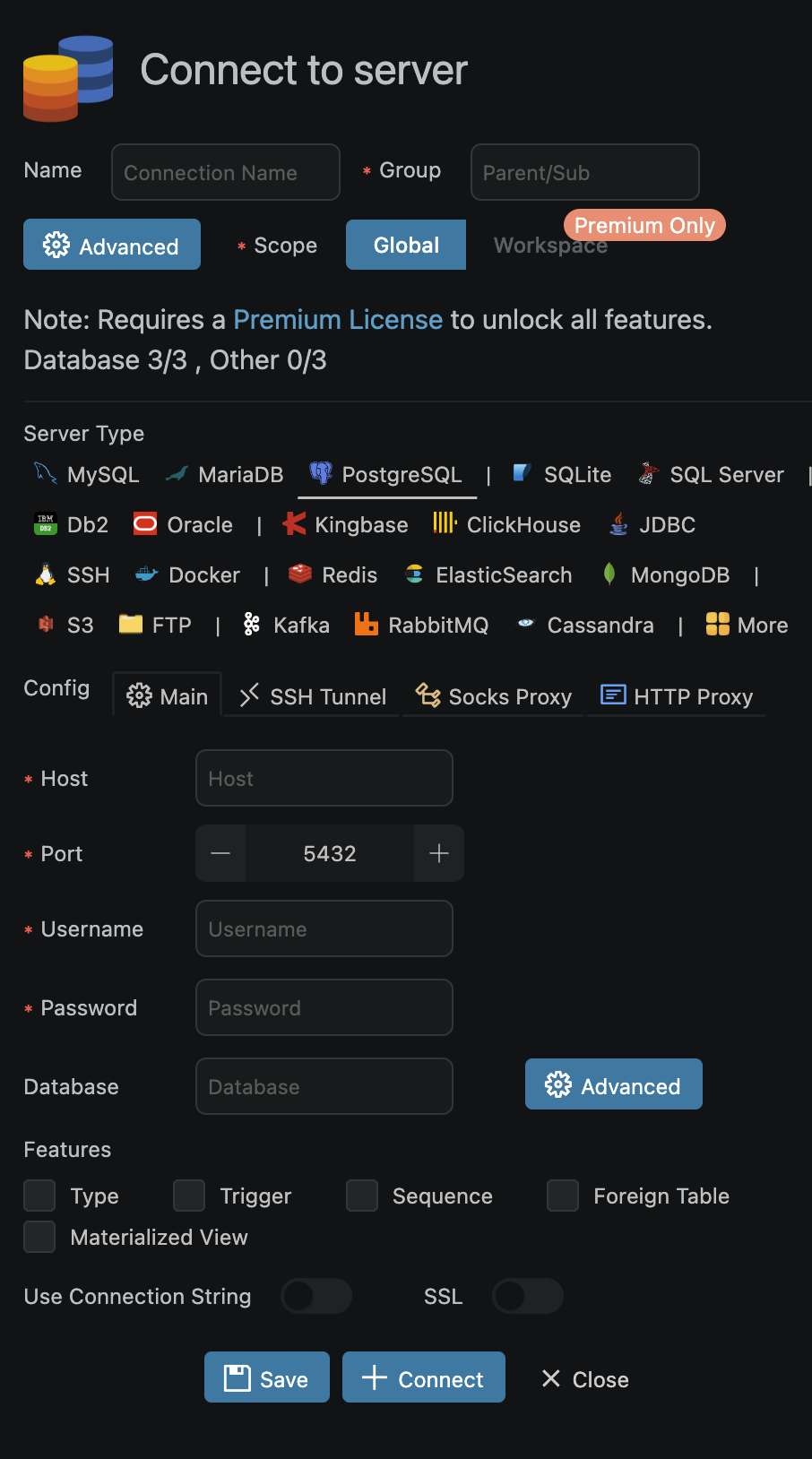
- Fill in the credentials. Pay attention to open the tab PostgreSQL.
Note
Once connected, you can do SQL queries that correspond to the rights that you have (see Section 1).
Those tools also provide options to export your selection in a file (csv, gpkg, …). That gives an easy option to manipulate further the data in code with library such as pandas or geodataframe.
Access in code
You may need to get the data directly through SQL requests, in code. The python QBuildings repository is not packaged at the moment. Some code snippets in python are provided below for the functions that will be useful in case you need to manipulate the data in code.
It relies mostly on SQLAlchemy and pandas/geopandas modules to connect to the database.
1. Connect to the database
The connection is establish by creating an engine with the credentials. Classically, you keep them in a separated file such as an .ini.
Note
name_of_db.ini
Note
establish_connection
from sqlalchemy import create_engine, MetaData, select
import configparser


def establish_connection(db, schema):
    """
    :param db: Name of the database to which we want to connect - Suisse, Geneva, ...
    :param schema: Name of the schema you want to connect to - Aggregated, Processed, Smoothed
    """
    # Database connection
    file_ini = your_own_path + "/" + db + ".ini"

    project = configparser.ConfigParser()
    project.read(file_ini)

    # Database
    db_schema = schema
    try:
        db_engine_str = 'postgresql+psycopg2://{}:{}@{}:{}/{}'.format(project['database']['username'],
                                                                      project['database']['password'],
                                                                      project['database']['host'],
                                                                      project['database']['port'],
                                                                      project['database']['database'])
        db_engine = create_engine(db_engine_str)
        connection = db_engine.connect()
        print('Connected to database')

    except:
        print('Cannot connect to database engine')

    if 'database' in project:
        print('\thost: {}\n\tport: {}\n\tdatabase: {}\n\tusername: {}'.format(
            project['database']['host'],
            project['database']['port'],
            project['database']['database'],
            project['database']['username']))

    metadata = MetaData(bind=db_engine)
    if isinstance(db_schema, list):
        for schema in db_schema:
            metadata.reflect(schema=schema)
    else:
        metadata.reflect(schema=schema)

    return db_engine, connection, metadata

db_name = "Suisse" # Corresponds to the name of your `Suisse.ini`
db_schema = "Processed"  # Should be the schema you want to access

db_engine, connection, metadata_db = establish_connection(db_name, db_schema)
2. Select elements of the database
Once the tables are reflected using establish_connection(db_name , db_schema), you are set to query the database.
The simplest query is the select query that you can then convert to a DataFrame.
Note
read_postgis
It returns a GeoDataframe with all the rows from the database.
import sqlalchemy as sa
from sqlalchemy.dialects import postgresql
import geopandas as gpd

db_schema = "Processed"  # Should be the schema you want to access
table_name = "buildings"  # The table you want to access
selectQuery = sa.select(tables[db_schema + '.' + table_name])

data = gpd.read_postgis(selectQuery.compile(dialect=postgresql.dialect()), con=db_engine, geom_col='geometry').fillna(np.nan)
However, read_postgis is slow so in case you have a large set of data, you may prefer to fetch the rows not all at once.
Note
big_select
Useful if many rows need to be fetched, may need to do it in several steps.
selectQuery = sa.select(tables[db_schema + '.' + table_name])
order = connection.execute(selectQuery.compile(dialect=postgresql.dialect()))
flag = True
results = []
while flag:
    partial_results = order.fetchmany(1000)
    if not partial_results:
        flag = False
    else:
        results += partial_results
data = pd.DataFrame(results)
geom = gpd.GeoSeries(to_shape(row) for row in data['geometry'])
data = gpd.GeoDataFrame(data, geometry=geom)
Note
conditional_select
Finally, if needed a condition can be added on the row to be selected.
columns_with_criteria = 'id'  # The column on which there is the selection criteria
selection = eval(tables[db_schema + '.' + table_name] + ".columns." + columns_with_criteria)
criteria = 10  # The value on which the selection has to be made
selectQuery = sa.select(tables[db_schema + '.' + table_name]) \
            .where(selection == criteria)
If the selection has to be done on more than one criteria, then a join query should be done. It is highly recommended to perform join queries on keys (primary key or foreign key) to fasten the result.
Additional options on select are ORDER BY, GROUP BY and HAVING. It is also much faster to do it in SQL than using pandas.
Slice the data
For personal usage, where you need to modify the content of the database, the best thing to do is to create a database for the area on which you are going to work. To do so, the easiest way is to select the data from QBuildings-Suisse that cross the area and insert them into a new db.
The first step is to create your own PostgreSQL database, where you get full grants to your own db and a db with the same tables as the ones in QBuildings-Suisse but empty. To fill it, extract the right data from Suisse.
In python, the code snippet below can help you doing so.
Note
copy_by_mask
The copy_by_mask function will copy the data from Suisse into your db, according to the geographical mask used as a filter.
import psycopg2
from geoalchemy2 import Geometry
from sqlalchemy.dialects import postgresql
import geopandas as gpd
import pandas as pd
from timeit import default_timer as timer
from geoalchemy2.shape import to_shape

def copy_by_mask(db_from, db_to, schema_to_copy, mask):
    """
    :param db_from: dictionary with the information of db from which the data have to be imported
    :param db_to: dictionary with the information of db from which the data have to be exported
    :param mask: a geopackage that delimits the area of interest
    :return:
    """

    def insert_query(db_to, t, selection_query, nrows):
        connect_to = db_to['engine'].connect()
        order = connection.execute(selection_query.compile(dialect=postgresql.dialect()))
        nrows = connection.execute(nrows.compile(dialect=postgresql.dialect())).fetchone().count
        flag = 0
        divider, remain = divmod(nrows, 100000)
        while flag < divider:
            partial_results = order.fetchmany(100000)
            if not partial_results:
                flag = divider + 1
            else:
                df_inter = pd.DataFrame(partial_results)
                geom = gpd.GeoSeries(to_shape(row) for row in df_inter['geometry'])
                df_inter = gpd.GeoDataFrame(df_inter, geometry=geom, crs='EPSG:2056')  # TODO: get the CRS from SQL
                df_inter.to_postgis(name=re.split("\.", t)[1], if_exists='append', schema=re.split("\.", t)[0], con=db_to['engine'])
        partial_results = order.fetchmany(remain)
        if partial_results:
            df_inter = pd.DataFrame(partial_results)
            geom = gpd.GeoSeries(to_shape(row) for row in df_inter['geometry'])
            df_inter = gpd.GeoDataFrame(df_inter, geometry=geom, crs='EPSG:2056')
            df_inter.to_postgis(name=re.split("\.", t)[1], if_exists='append', schema=re.split("\.", t)[0], con=db_to['engine'])

        connect_to.close()
        return

    mask = gpd.read_file(filename=mask)
    tables = db_from['metadata'].tables

    for schema in schema_to_copy:
        connection = db_from['engine'].connect()
        # Select transformers
        print('\nSelect transformers from ' + schema + ' by intersection\n\n')
        geom = mask['geometry'].buffer(-150).to_wkb().tolist()[0]
        df_transformer = tables[schema + '.' + 'transformers']
        transfoQuery = select(df_transformer).where(df_transformer.c.geometry.st_intersects(geom))
        nrows = select(func.count(df_transformer.c.id)).where(df_transformer.c.geometry.st_intersects(geom))
        ctequery = transfoQuery.cte()
        insert_query(db_to, schema + '.' + 'transformers', transfoQuery, nrows)

        # Select buildings
        start = timer()
        print('Select buildings corresponding to the selected transformers')
        j = tables[schema + '.' + 'buildings']. \
            join(ctequery, tables[schema + '.' + 'buildings'].c.transformer == ctequery.c.id)
        df_building = tables[schema + '.' + 'buildings']
        buildingQuery = select([df_building]).select_from(j)
        nrows = select(func.count(df_building.c.id_building)).select_from(j)
        ctequery_build = select([df_building.c.id_building]).select_from(j).cte()
        insert_query(db_to, schema + '.' + 'buildings', buildingQuery, nrows)

        end = timer()
        print('Operation took', end - start)

        # Select tables
        if schema == 'Aggregated':
            tables_to_copy = ['buildings_RegBL', 'roofs', 'facades']
        else:
            tables_to_copy = ['roofs', 'facades']
        for t in tables_to_copy:
            print('Select', t, 'according to selected buildings')
            start = timer()
            j_build = tables[schema + '.' + t].join(ctequery_build, tables[schema + '.' + t].c.id_building
                                                    == ctequery_build.c.id_building)
            sqlQuery = select([tables[schema + '.' + t]]).select_from(j_build)
            nrows = select(func.count(tables[schema + '.' + t].c.id_building)).select_from(j_build)
            insert_query(db_to, schema + '.' + t, sqlQuery, nrows)
            end = timer()
            print('Operation took', end - start, 'for table', t)
        connection.close()

    return print('Data copied')

if __name__ == '__main__':
    schemas = ['Aggregated', 'Processed', 'Smoothed']
    db_engine_suisse, metadata_suisse = establish_connection("Suisse", schemas)
    db_engine_db, metadata_db = establish_connection("your_db", schemas)

    db_from = {'engine': db_engine_suisse,
               'metadata': metadata_suisse
               }
    db_to = {'engine': db_engine_db,
             'metadata': metadata_db
             }
    mask = 'your_perimeter.gpkg'
    copy_by_mask(db_from, db_to, schemas, mask)